
EDG product · Dynamics 365 F&SCM
See Dynamics 365 through any user’s eyes
Get total visibility into permission levels and security roles in your Dynamics 365 environment.

Overview
Achieve complete visibility into roles and permission levels in your environment. The EDG Persona Security Tool lets you view, troubleshoot, design and better understand user roles and permission levels in Dynamics 365.
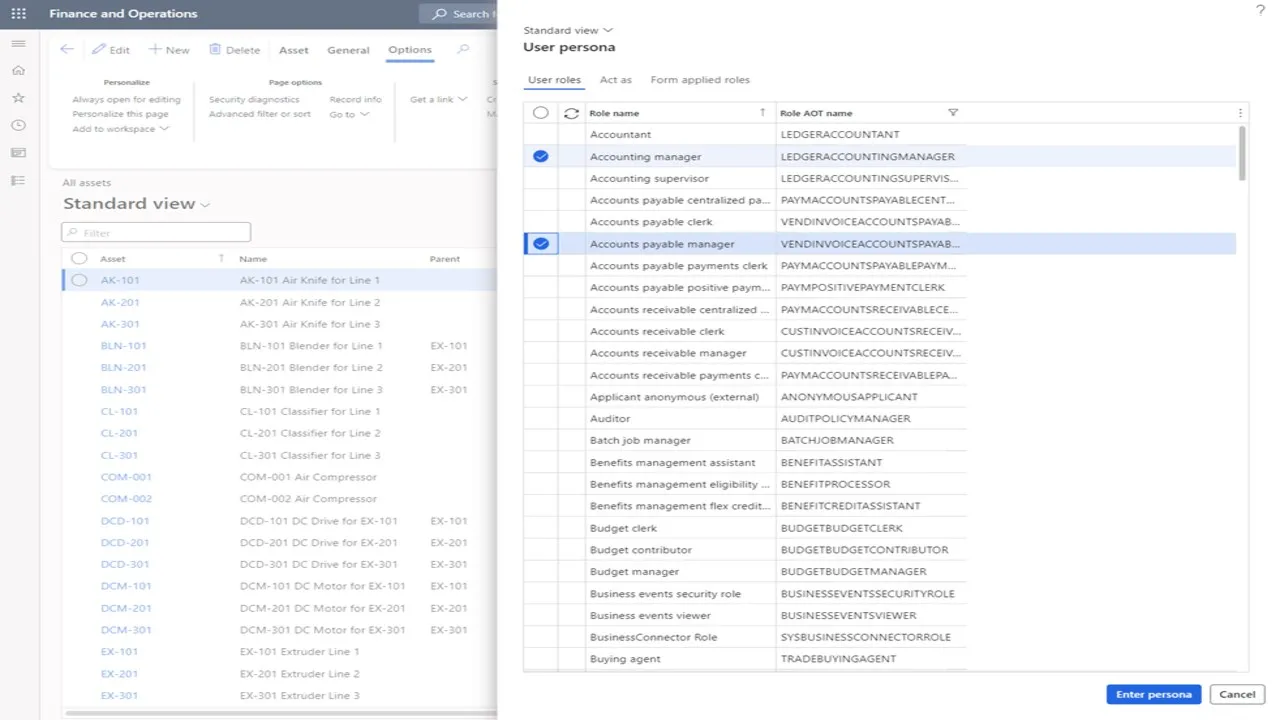
Enter a “persona” made of any security role or combination of roles in your environment, then browse Dynamics 365 and see precisely what a user with those roles and permission levels would see.
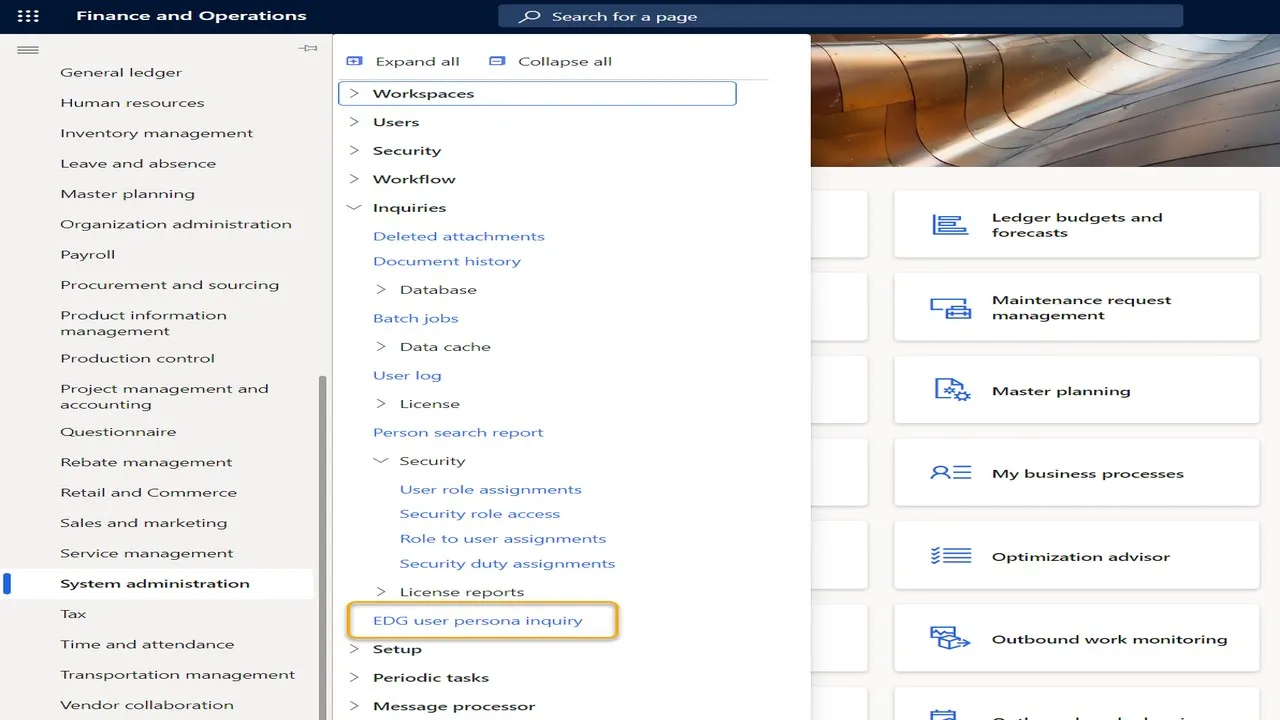
You can also view the roles and permissions required for any page or form, so access issues are resolved quickly and role design and testing become far more flexible.
Key features
What you get
Everything runs inside Dynamics 365, using the data and security you already have.
View D365 as another role
Browse any page through the lens of another security role or combination of roles, exactly as that user would see it.
Troubleshoot in seconds
Find the cause of user environment issues, missing menu items and permission errors without trial and error.
Required roles for any form
Conveniently view the permission levels and security roles needed for any form or page in Dynamics 365.
Flexible role design and testing
Try role combinations before assigning them, and speed up the testing and design of your security model.
Access control and delegation
Support access control, user delegation and user approval decisions with a clear view of what each role grants.
Usage and activity tracking
Automated tracking of persona usage and activity, so you know who used the tool and when.
How it works
Simple steps, one connected process
Open any page
Go to any workspace, list or form in Dynamics 365 Finance or Supply Chain Management.
Enter persona
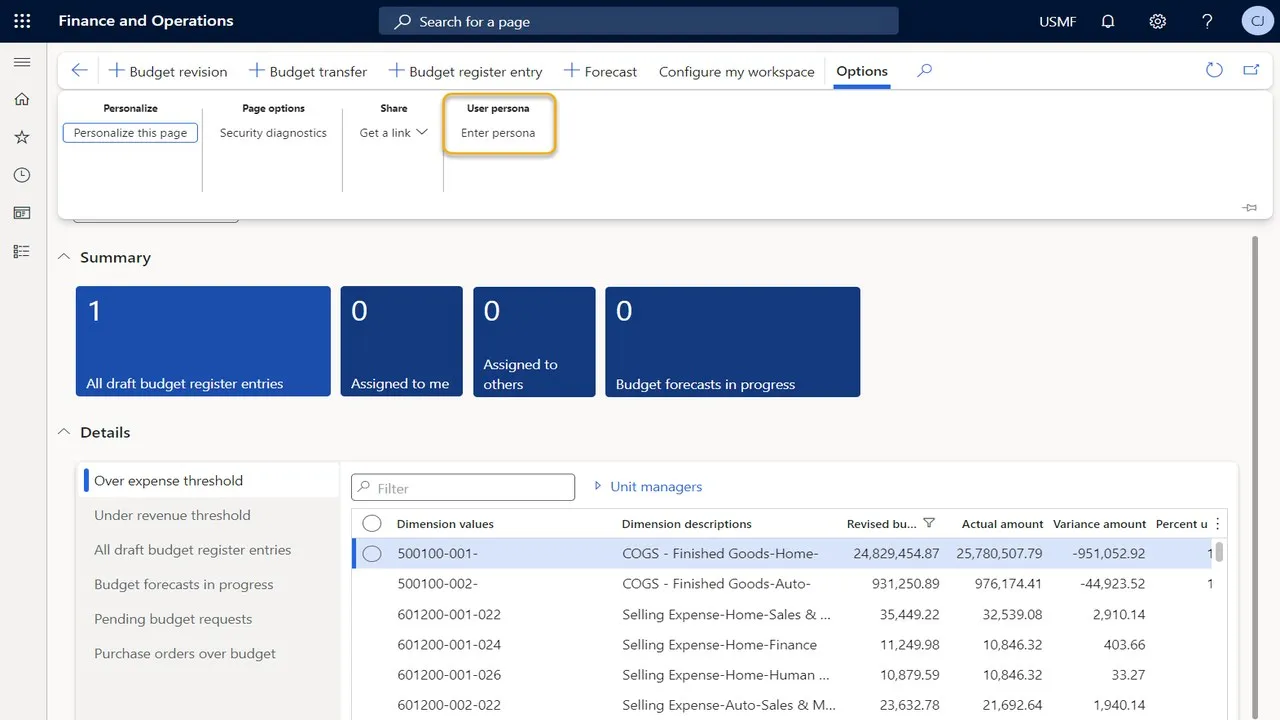
From the Options tab, choose User persona › Enter persona.
Pick the roles
Select one or more security roles on the User roles tab, then confirm.
Browse and compare
Navigate D365 exactly as that persona, and check the roles applied to each form.
Screenshots
See it in Dynamics 365
Benefits
Save time across every security task
- View your Dynamics 365 environment through another role or combination of roles
- Quickly troubleshoot permission levels and role security issues
- Support access control, user delegation and user approval
- Speed up the testing and design process of your Dynamics 365 environment
- Give end users a better experience with correctly designed roles
In detail
Coverage at a glance
Use it for
- Security role design
- User acceptance and role testing
- Training material that matches each role
- Help-desk troubleshooting
- Security reviews and audits
What you can see
- Pages and menus visible to a persona
- Roles applied to the current form
- Required permission levels per form
- Any combination of roles in your environment
- Usage and activity history
Works with
- Dynamics 365 Finance
- Dynamics 365 Supply Chain Management
- Your existing security roles, duties and privileges
Who it’s for
- Security administrators
- Functional consultants and solution architects
- Testers and trainers
- Support and help-desk teams
Resources
Learn more and get started
Download the product documents, view the listing on Microsoft Marketplace, or ask us for a walkthrough in your own Dynamics 365 environment.
- DownloadPersona Security Tool overview (PDF)
- Questionssupport@expertdynamicsgroup.com
FAQ
Persona Security Tool FAQs
What does the EDG Persona Security Tool do?
It lets you view Dynamics 365 Finance and Supply Chain Management through any security role or combination of roles, so you can see exactly what a user with those roles would see. It also shows the roles and permissions required for any page or form.
How is it different from the standard security inquiries?
Standard inquiries list role and privilege assignments. The Persona Security Tool lets you actually browse the application as a persona, which makes it much faster to confirm what a role can see and to find why a user cannot access something.
Can I test a role combination before assigning it to a user?
Yes. You can select any combination of roles in your environment as a persona and browse with it, which makes role design and testing more flexible.
Is persona usage tracked?
Yes. The tool includes automated usage and activity tracking.
Which Dynamics 365 apps does it support?
Dynamics 365 Finance and Dynamics 365 Supply Chain Management (Finance & Operations apps).
More EDG products
Built by EDG
EDG Export Document Management (EDM)
Automate U.S. export documents and AES/EEI filing to CBP, right inside Dynamics 365 Finance & SCM.
RUNIQ Test Automation for Dynamics 365 F&O
Record, organize and run end-to-end Dynamics 365 Finance & Operations test cycles in minutes, with no scripts to maintain.
Signal Chemical Delivery Mobile App
Validate every chemical delivery with 3-point QR scanning, safety checks and offline-ready cloud sync on iOS and Android.
See Persona Security Tool in action
Book a walkthrough of Persona Security Tool in a Dynamics 365 environment and talk through how it fits your processes.