
EDG product · Dynamics 365 F&SCM
Export documents and CBP filing, right inside Dynamics 365
Automate U.S. export documents and AES/EEI filing to CBP, right inside Dynamics 365 Finance & SCM.
Overview
File with CBP in minutes, not hours, without leaving Dynamics 365. EDM turns the sales orders, shipments, loads, customers and items you already maintain into export documents and Electronic Export Information (EEI) filings. One source of data, one system, no re-entry.
Every U.S. export needs accurate paperwork and, often, an EEI filing in the Automated Export System (AES). For most exporters that means re-keying order and shipment data into a separate filing portal or relying on a forwarder, which is slow, error-prone and hard to audit.
EDM is built for manufacturers, distributors and aerospace and defense suppliers shipping from the United States. It handles everyday commercial exports and complex, regulated shipments with the same process.
Key features
What you get
Everything runs inside Dynamics 365, using the data and security you already have.
Export documents in one click
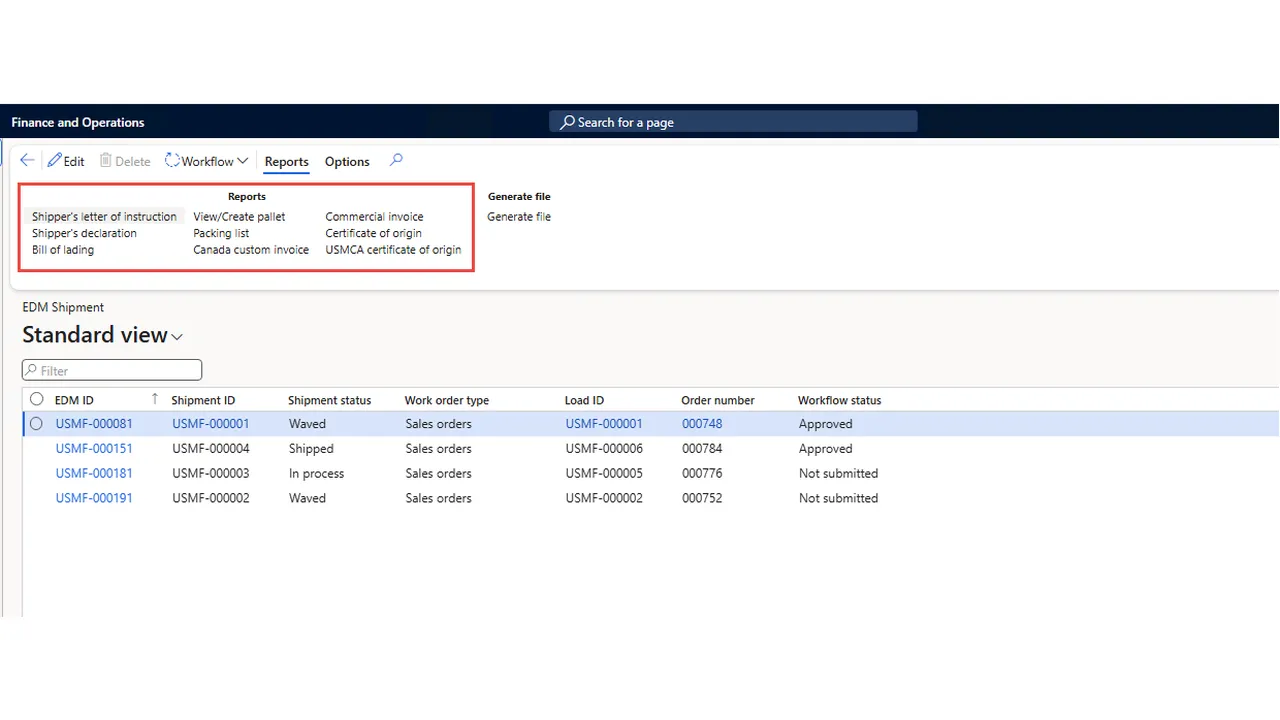
Commercial invoices, certificates of origin, USMCA certificates, shipper’s letters of instruction, shipper’s declarations, bills of lading, packing lists and Canada customs invoices, generated from your existing transactions.
Direct AES filing
EEI is created and transmitted to CBP over a secure, certificate-authenticated IBM MQ connection, with responses tracked in Dynamics 365.
Validation before you file
Filings are built to CBP’s AES Trade Interface Requirements (AESTIR), so errors are caught before they reach customs.
Fast corrections
Add, remove or correct commodity lines and shipment details, or cancel a filing, and resubmit without re-keying.
Control and approvals
Route shipments through configurable approval workflows before documents are produced or filed.
Paperwork ready ahead of time
A scheduled EDM Creation Job turns new and updated warehouse shipments into EDM records automatically.
How it works
Simple steps, one connected process
Create
The EDM Creation Job builds the export record from shipment, order, customer and item data.
Validate
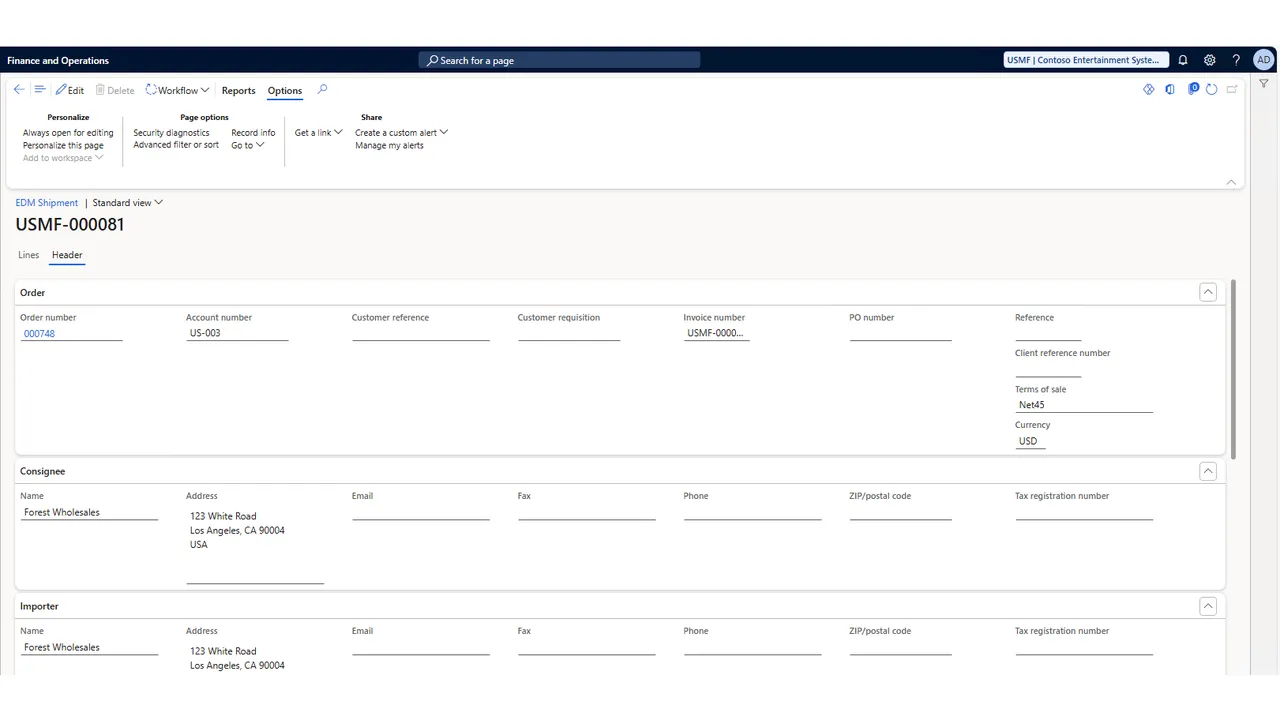
Review header, parties, transport and commodity lines, and correct anything flagged.
Approve
Route the shipment through the configured EDM approval workflow.
Generate & send
Print the export documents, generate the AES file and transmit it to CBP over secure MQ.
Receive response
Read the AES response and identify warnings, errors or acceptance.
Close or correct
Update EDM with the ITN and status, or correct and resubmit.
Screenshots
See it in Dynamics 365
Benefits
Why exporters choose EDM
- Cut hours of duplicate data entry per shipment
- Lower the risk of filing errors, penalties and shipment holds
- Ship faster, with documents ready before the truck arrives
- Keep a complete, auditable record of every filing, correction and approval
- Manage ITAR and export-controlled shipments with the same process as routine ones
In detail
Coverage at a glance
Documents generated
- Commercial invoice
- Packing list
- Bill of lading
- Certificate of origin
- USMCA certificate of origin
- Shipper’s letter of instruction
- Shipper’s declaration
- Canada customs invoice
Regulated & special shipments
- Licensed and license-exempt exports
- ITAR / DDTC USML items
- BIS export-controlled commodities (ECCN)
- Hazardous materials (UN number per line)
- Post-departure filing
- US–UK Defense Trade Cooperation Treaty
- Household goods, exhibition goods and used vehicles
Reference data in Dynamics 365
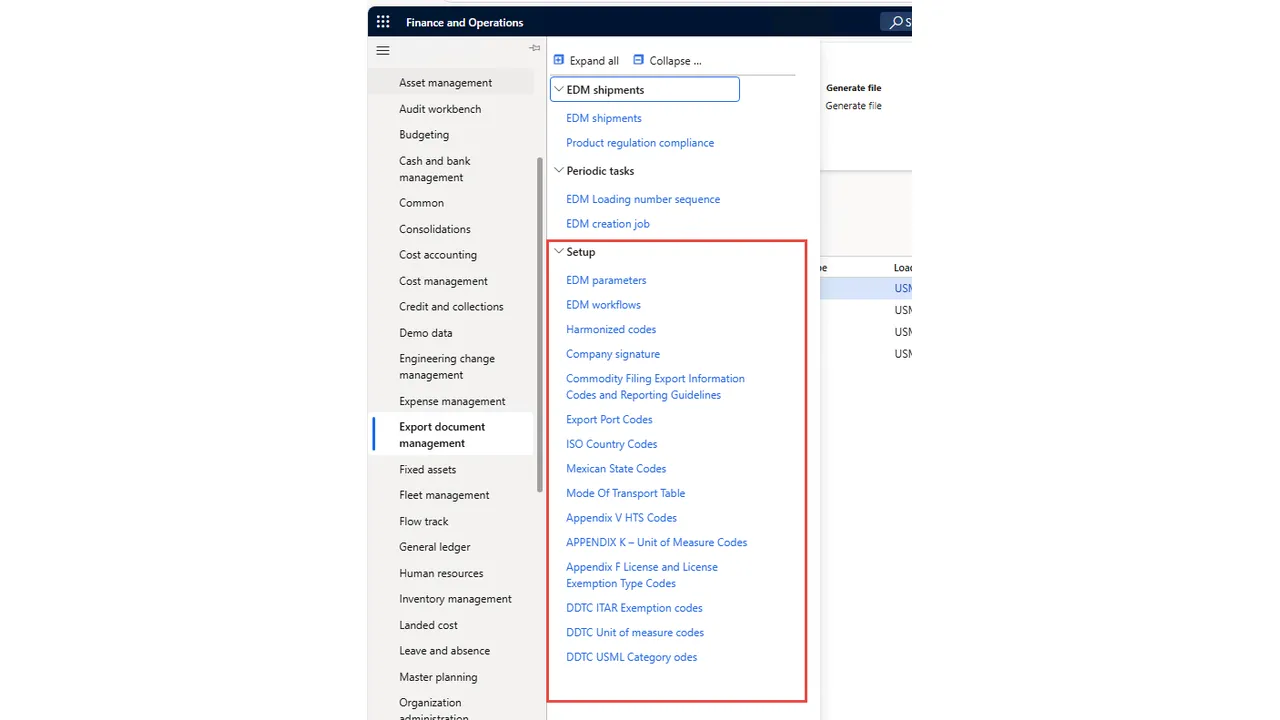
- EDM parameters and workflows
- Harmonized and Appendix V HTS codes
- ISO country and Mexican state codes
- Export port codes and mode of transport
- Appendix F license and exemption codes
- Appendix K units of measure
- DDTC ITAR exemptions, units and USML categories
What you’ll need
- Dynamics 365 Finance and Supply Chain Management
- A CBP filer account (USPPI, Filer and Transmitter IDs)
- IBM MQ Client with CBP-issued certificates
- Outbound firewall access to the CBP AES gateway
Who it’s for
- U.S. exporters running Dynamics 365
- Export compliance and trade teams
- Warehouse and shipping operations
- Dynamics 365 administrators and partners
Resources
Learn more and get started
Download the product documents, view the listing on Microsoft Marketplace, or ask us for a walkthrough in your own Dynamics 365 environment.
- DownloadEDM product brochure (PDF)
- DownloadEDM feature flyer (PDF)
- DownloadEDM overview (PDF)
- Questionssupport@expertdynamicsgroup.com
FAQ
Export Document Management FAQs
What is EDG Export Document Management?
EDM is a Dynamics 365 Finance and Supply Chain Management add-on from Expert Dynamics Group. It generates U.S. export documents and Electronic Export Information (EEI) filings from shipment, order, customer, vendor and item data already in Dynamics 365, and transmits the filings to CBP’s Automated Export System (AES).
Which export documents does EDM produce?
Eight documents: commercial invoice, packing list, bill of lading, certificate of origin, USMCA certificate of origin, shipper’s letter of instruction, shipper’s declaration and Canada customs invoice.
How does EDM file with CBP?
EDM generates the AES file and sends it to CBP through an IBM MQ Client over TLS, authenticated with your CBP-issued client certificate. AES responses are read back into Dynamics 365 so you can see acceptance, warnings or errors and correct and resubmit when needed.
Does EDM handle ITAR and export-controlled goods?
Yes. EDM supports licensed and license-exempt exports, ITAR/DDTC USML items, BIS export-controlled commodities (ECCN), hazardous materials and special cases such as post-departure filing and US–UK Defense Trade Cooperation Treaty shipments.
Has EDM been tested against CBP’s requirements?
EDM’s filings are built to the AESTIR record structure and were exercised against all 26 CBP AES long-test scenarios, covering standard filings, cancellations and corrections, validation errors and regulated goods. We also help you prepare for CBP certification.
What do we need before using EDM?
Dynamics 365 Finance and Supply Chain Management, a CBP filer account (USPPI, Filer and Transmitter IDs), an IBM MQ Client with CBP-issued certificates, and outbound firewall access to the CBP AES gateway.
More EDG products
Built by EDG
EDG Persona Security Tool for Dynamics 365
Get total visibility into permission levels and security roles in your Dynamics 365 environment.
RUNIQ Test Automation for Dynamics 365 F&O
Record, organize and run end-to-end Dynamics 365 Finance & Operations test cycles in minutes, with no scripts to maintain.
Signal Chemical Delivery Mobile App
Validate every chemical delivery with 3-point QR scanning, safety checks and offline-ready cloud sync on iOS and Android.
See Export Document Management in action
Book a walkthrough of Export Document Management in a Dynamics 365 environment and talk through how it fits your processes.