
EDG product · Test automation for Dynamics 365 F&O
Test automation built for Dynamics 365 F&O
Record, organize and run end-to-end Dynamics 365 Finance & Operations test cycles in minutes, with no scripts to maintain.

Overview
RUNIQ helps Dynamics 365 Finance and Operations teams record, organize and run end-to-end test cycles in minutes.
Generic test tools fall over on F&O: slow form loads, dynamic lookups, iframes, sub-grids and action panes. Teams end up with brittle scripts, X++ glue code and weeks of manual UAT before every release.
RUNIQ was built inside Expert Dynamics Group after years of fighting those problems on real F&O implementations. Its recorder, cycle planner and results view understand F&O the way functional consultants already do.
Key features
What you get
Record in the browser, run from one workspace. No X++, no Selenium grid, no local agents to manage.
F&O-aware recorder
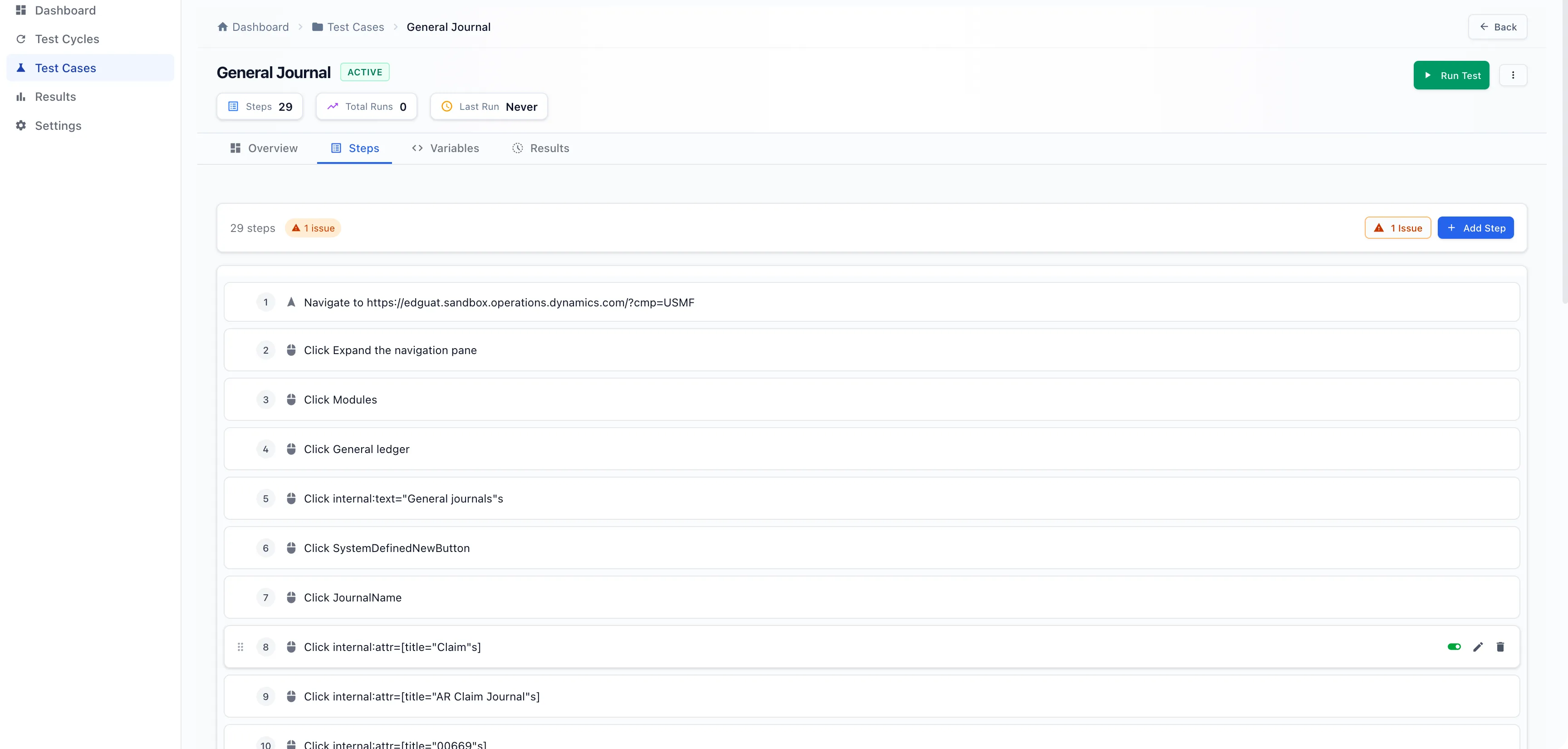
Capture clicks, lookups, grid edits and action pane commands with the RUNIQ Chrome extension. Every step is stored as an editable, named action, with no X++ or Selenium boilerplate.
End-to-end business cycles
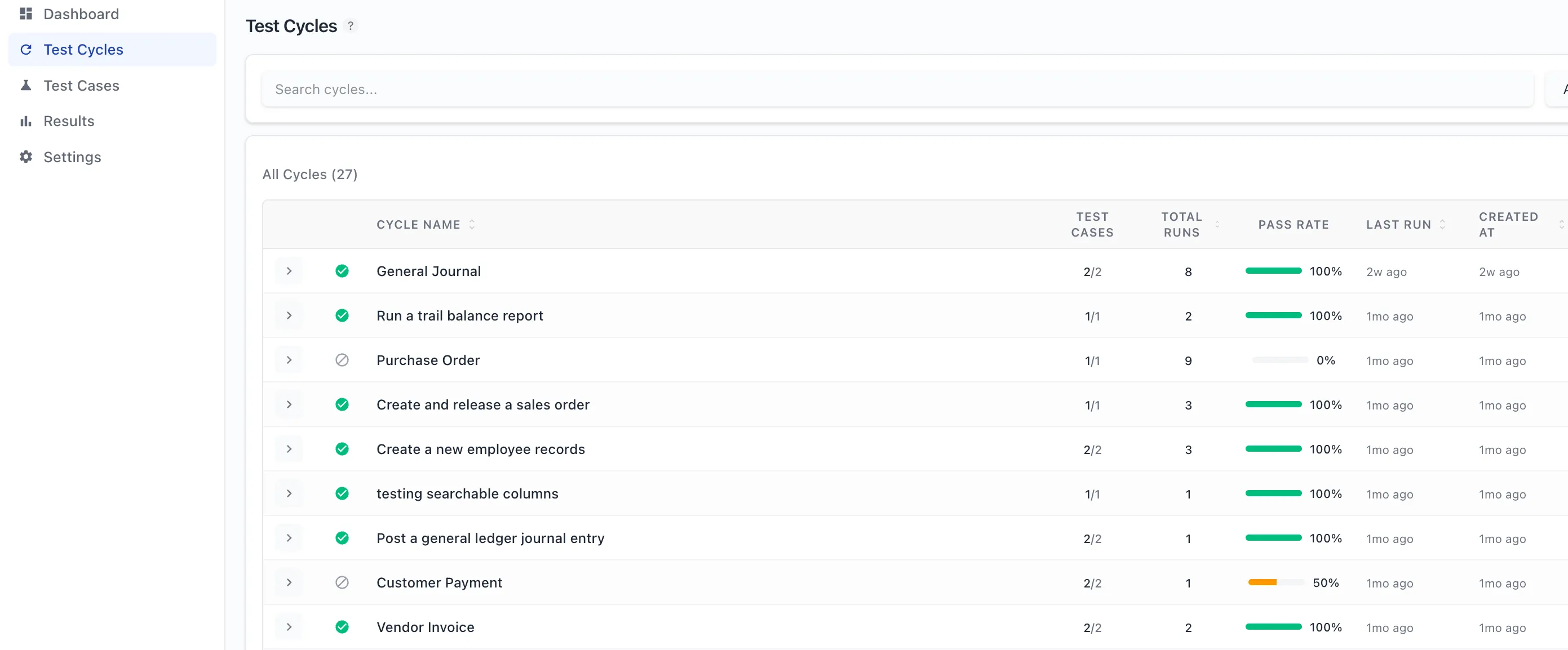
Group test cases into Procure-to-Pay, Order-to-Cash or Period Close cycles, set the order with drag and drop, and run the whole journey.
Smart variables
Vendor IDs, item numbers, legal entities and URLs are extracted from recordings automatically. Run the same flow across DEV, UAT and PROD, or another company, without re-recording.
Video replay for UAT sign-off
Every cycle run is recorded. Share the exact clip of a failing posting routine with your functional consultants.
Audit-ready change logs
Every test case and cycle keeps a full edit history of who changed what and when, ready for SOX-style reviews and upgrade evidence.
Built for F&O complexity
Selector strategies tuned for model-driven forms, sub-grids, segmented entry, lookups, action panes, dialogs and iframes, so tests don’t break on every form redraw.
How it works
Simple steps, one connected process
Install the extension
Add the RUNIQ recorder to Chrome or another Chromium browser and pin it to the toolbar.
Record a test case
Name the case, enter your F&O URL and step through Dynamics 365 like a real user.
Build a cycle
Add cases to a cycle, set the order and override variables for each legal entity or environment.
Run & review
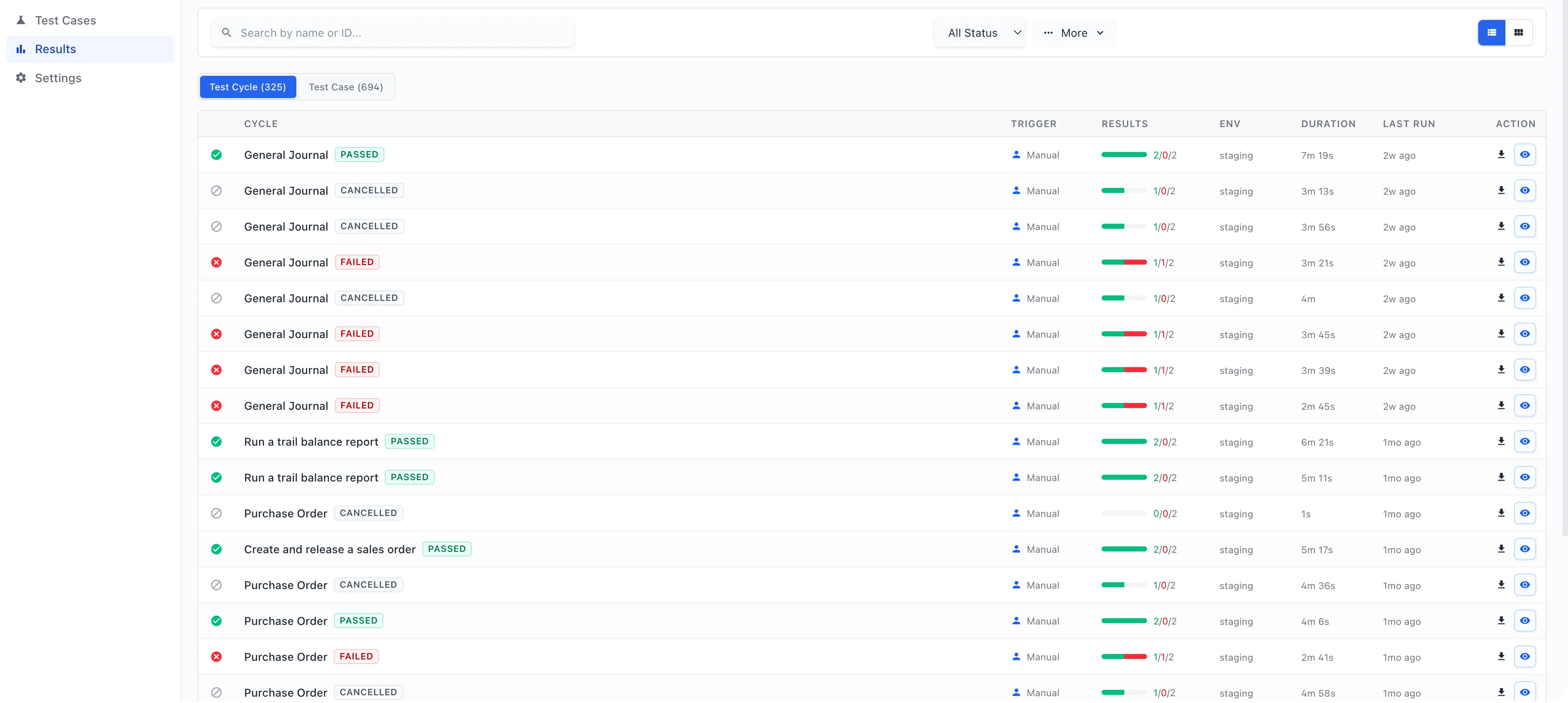
Run the cycle, watch results live, then review the video and step history for sign-off.
Screenshots
See it in action
Benefits
Less manual UAT, faster releases
- Replace brittle scripts and spreadsheet-driven UAT with one focused workspace
- Run full regression cycles before every Microsoft service update
- Reuse the same recordings across environments and legal entities
- Give functional consultants clear video evidence of every failure
- Keep an auditable history of tests, changes and runs for upgrades and reviews
In detail
Coverage at a glance
F&O interactions covered
- Lookups and segmented entry
- Sub-grids and line entry
- Action panes and ribbons
- Dialogs and auto-save prompts
- Workflows and approvals
- Batch jobs and posting routines
Cycles & variables
- Map view with drag-and-drop ordering
- Overview, Test Cases, Variables and Results tabs
- Per-cycle variable overrides
- Apply variable updates across cycles
- Company switching (e.g. USMF, USRT, DEMF)
Results & governance
- Auto-recorded video for every cycle run
- Run drawer with step-level history
- Filter by status, name or date range
- Passed, failed, running and cancelled counts
- Full change log on every test case
What you’ll need
- Dynamics 365 Finance & Operations apps (DEV, UAT or PROD)
- Chrome, Edge or another Chromium-based browser
- The RUNIQ Chrome extension
- A RUNIQ workspace (contact us for a trial)
Who it’s for
- F&O functional consultants
- UAT leads and QA engineers
- Dynamics 365 implementation and support teams
- Programs preparing for upgrades and service updates
Resources
Learn more and get started
Ask us for a trial, or book a walkthrough of RUNIQ recording and running a cycle in your own Dynamics 365 Finance & Operations environment.
- Questionssupport@expertdynamicsgroup.com
FAQ
RUNIQ Test Automation FAQs
What is RUNIQ?
RUNIQ is a no-code test automation platform for Microsoft Dynamics 365 Finance and Operations, built and supported by Expert Dynamics Group. Consultants, UAT leads and QA engineers record browser flows, organize them into cycles and run them on demand.
What do I need to install?
Just the RUNIQ Chrome extension. Recording happens in your browser; playback and storage live in the RUNIQ workspace. There are no local agents or Selenium grid to manage.
Which browsers are supported?
Chrome and other Chromium-based browsers such as Microsoft Edge and Brave.
How does RUNIQ handle F&O-specific controls?
Turn on F&O mode when you start a recording and RUNIQ uses selector strategies tuned for sub-grids, lookups, segmented entry, action panes and dialogs. It waits for lookups and state transitions instead of relying on fixed timeouts.
Can the same test run in different environments or legal entities?
Yes. RUNIQ extracts values such as legal entity, vendor account, item number and F&O URL into variables. Override them per cycle to run the same recording against DEV, UAT or PROD, or another company.
Is our F&O test data secure?
Data is encrypted in transit and at rest, and F&O credentials and tenant secrets are encrypted and never logged. Enterprise customers can also discuss self-hosting the execution layer.
More EDG products
Built by EDG
EDG Export Document Management (EDM)
Automate U.S. export documents and AES/EEI filing to CBP, right inside Dynamics 365 Finance & SCM.
EDG Persona Security Tool for Dynamics 365
Get total visibility into permission levels and security roles in your Dynamics 365 environment.
Signal Chemical Delivery Mobile App
Validate every chemical delivery with 3-point QR scanning, safety checks and offline-ready cloud sync on iOS and Android.
See RUNIQ Test Automation in action
Book a 20-minute demo with our Dynamics 365 Finance & Operations team, or get in touch to start a RUNIQ trial.